BookML: LaTeX to html, made easy(ish).
Powered by LaTeXML.
Abstract
BookML is a fully automated solution for the production of accessible html content straight from LaTeX, based on LaTeXML for the widest LaTeX compatibility and bookdown for a modern and accessible look. Integration with Overleaf is provided via a GitHub action. Outputs are also packaged as SCORM for ease of use in higher education. Created by and maintained for maths lecturers at the University of Leeds.
Downloads and sources available on GitHub.



Formats: GitBook (html), plain with Latin Modern (html), PDF, LaTeX source.
For Leeds-specific instructions see the Leeds BookML guide.
BookML is a small package to help you convert LaTeX documents into accessible html very similar to the one produced by bookdown. The conversion is done by LaTeXML, which understands a wide collection of LaTeX packages and can deal with all sorts weird constructs. To see plain(ish) LaTeXML in action, just open any arXiv html preprint. For examples of BookML documents, see:
- •
- •
-
•
forall : Calgary by Richard Zach.
-
•
Representation Theory. A Categorical Approach by Jan E. Grabowski.
-
•
Probabilidade by Leonardo T. Rolla and Bernando N.B. de Lima.
-
•
Some resources of REA-MECC.
BookML key features are:
-
•
simple installation: BookML is just a zip file you unpack in the folder containing your .tex files (admittedly a lie: you must install LaTeXML first, see Getting started on your device);
-
•
Overleaf and GitHub integration: BookML can also be used with Overleaf by adding a single file to your project and linking it to GitHub (which requires a paid Overleaf subscription), or by directly putting your files on GitHub;
-
•
accessible and mobile friendly output based on the popular bookdown project, including font selection and dark mode, tweaked to meet the Web Content Accessibility Guidelines 2.1 level AA;
-
•
fully automated (re-)compilation based on which files have changed on disk, powered by GNU Make: running a single
makewill recompile the files which need updating; -
•
high quality conversion of external EPS and PDF figures to SVG via dvisvgm, rather than ImageMagick used by LaTeXML;
- •
-
•
easy insertion of alternative text for images;
-
•
arbitrary html content in LaTeX, for instance to create foldable paragraphs;
-
•
declare and include alternative PDF versions, which are also recompiled automatically (for instance sans serif, large print);
-
•
outputs are automatically packaged into zip files and SCORM packages, which are supported natively by most Learning Management Systems.
1 Getting started
1.1 On your device
- 1.
-
2.
Unpack the latest BookML release and put the bookml folder next to your .tex files. You can also start with a minimal template.
-
3.
First time only: move bookml/GNUmakefile one folder up. It must be in the same folder as your main .tex files.
-
4.
Now open a terminal in the folder containing GNUmakefile and run
make detect(usegmake detecton Windows).
When all goes well, you should see an output like the following:
| Required | |
| Main files: | template.tex |
| BookML: | v0.29.4 OK |
| GNU Make: | 4.4.1 OK |
| TeX: | MiKTeX 25.4 OK |
| perl: | v5.42.0 OK |
| LaTeXML: | 0.8.8 OK |
| latexmk: | 4.87 OK |
| zip: | 3.1b OK |
| Optional: | for any image handling, including BookML images |
| Image::Magick: | NOT FOUND |
| --- PDFTOSVG_CONVERTER is set to ‘mutool’ --- | |
| Ghostscript: | 9.25 OK (BookML images, EPS to SVG, PDF to SVG via dvisvgm) |
| mutool: | 1.23.0 OK (PDF to SVG via mutool) |
| dvisvgm: | 3.4.3 OK (PDF to SVG via mutool)) |
| dvisvgm/libgs: | 9.25 OK (BookML images, EPS to SVG, PDF to SVG via dvisvgm) |
| Optional: | BookML images (\bmlImageEnvironment and \begin{bmlimage}) |
| preview.sty: | 14.0.6 OK |
| Optional: | misc |
| texfot: | 1.48 OK (hide irrelevant LaTeX messages) |
| curl: | 8.13.0 OK (update BookML with ‘make update’) |
The first line shows which files BookML will try to compile: every .tex file in the current folder that contains the string \documentclass (even if commented out!). The rest informs you on which software you may need to install or update. Not everything is necessary: the output of make detect will tell you what functionality requires a particular program. The Leeds BookML guide has detailed installation instructions for various platforms, many specific to the University of Leeds.
Finally, run make (or gmake on Windows). BookML will compile each ‘main file’ to a zip file and a SCORM package. You can view the results in the folder auxdir/html.
Tip: the first time you run BookML against a new document, add an early \end{document}, say after one or two pages, to check whether LaTeXML is handling well your selection of packages and macros.
1.2 Overleaf
If you have a paid Overleaf plan, you can also compile your Overleaf project on GitHub’s servers.
-
1.
Open your Overleaf account settings and link your GitHub account from the ‘GitHub Sync’ entry.
-
2.
Open an existing or new Overleaf project and start synchronizing it with a new GitHub repository. The process is smoother when the project name has no spaces. Note: I recommend you immediately visit the new repository and click the ‘Watch’ icon (next to ‘Edit Pins’, ‘Fork’, ‘Star’).
-
3.
Finally, add the file .github/workflows/bookml.yaml to the project with the following content:
on: pushjobs:build:runs-on: ubuntu-latestpermissions:contents: writesteps:- name: Compile with BookMLuses: vlmantova/bookml-action@v1Now synchronize the project with GitHub. First time only: GitHub will ask you to grant permissions to Overleaf to run workflows. Say yes!
-
4.
GitHub should start compiling all .tex files at the top folder of your Overleaf project that contain the string
\documentclass(even if commented out!). The work is done by the BookML Docker image, which at the moment contains a full copy of TeX Live 2021. -
5.
If you ‘watched’ the repository as recommended in the previous steps, you should receive an email in 2-3 minutes with the download links of all the outputs compiled by BookML and any relevant error messages. If you do not watch the repository, you must visit the repository page yourself and look for new entries under ‘Releases’ (below ‘About’) or open the latest workflow run under the ‘Action’ tab.
-
6.
Every time you want to compile a new version of your Overleaf project, just push the new changes to GitHub.
1.3 GitHub
-
1.
Simply add the file .github/workflows/bookml.yaml to your repositories with the following content:
on: pushjobs:build:runs-on: ubuntu-latestpermissions:contents: writesteps:- name: Compile with BookMLuses: vlmantova/bookml-action@v1I also recommend that you watch the repository (this is usually automatic when you create a repository; see the ‘Watch’ icon on the repository page, next to ‘Edit Pins’, ‘Fork’, ‘Star’).
-
2.
GitHub should start compiling all .tex files at the top folder of your repository that contain the string
\documentclass(even if commented out!). The work is done by the BookML Docker image, which at the moment contains a full copy of TeX Live 2021. -
3.
If you are watching the repository as recommended in the previous steps, you should receive an email in 2-3 minutes with the download links of all the outputs compiled by BookML and any relevant error messages. If you do not watch the repository, you must visit the repository page yourself and look for new entries under ‘Releases’ (below ‘About’) or open the latest workflow run under the ‘Action’ tab.
-
4.
Every push will start a new compile. If you push frequently, consider tweaking the action to run only when pushing to specific branches or tags.
If you ‘watched’ the repository as recommended in the previous steps, you should receive an email in 2-3 minutes with the download links of all the outputs compiled by BookML and any relevant error messages. If you do not watch the repository, you must visit the repository page yourself and look for new entries under ‘Releases’ (below ‘About’) or open the latest workflow run under the ‘Action’ tab.
1.4 Docker/Podman
BookML is also available as a Docker image, which automatically compile all .tex files at the top of the /source folder containing the string \documentclass (even if commented out!). The image is identical to the one used for Overleaf, and so it contains a full copy of TeX Live 2021.
You can run the Docker image by opening a terminal in the folder containing the .tex files and running
docker run --rm -i -t -v.:/source ghcr.io/vlmantova/bookmlAdditional arguments are passed to make, for instance
docker run --rm -i -t -v.:/source ghcr.io/vlmantova/bookml detectwill show an output similar to the one described in Getting started on your device.
2 Examples and tips
While many .tex files will be fine with no changes, you may want to tweak the output further by invoking the \usepackage{bookml/bookml} or by adding settings to GNUmakefile. When using Overleaf, that means you also need to upload the bookml/ folder. Below are some notable examples. For the full list of options and commands, see the Reference manual.
Alternative text
For \includegraphics, just add the option alt={description of the image}, as in
\includegraphics[alt={Computation of ...}]{figure1}For other images such as TikZ pictures, add \bmlDescription{text} right after the image. Do not leave any space between the picture and \bmlDescription! Please remember that sighted users can also benefit from descriptions. Consider using \begin{figure} and \caption{} instead.
Animations
Both animate and TikZ can produce animations, but LaTeXML does not support this at the moment. BookML can transparently convert the animations to SVG using \bmlImageEnvironment. For instance, add the following to the preamble:
\bmlImageEnvironment{animateinline}Then all animations created with animateinline from the animate package will be converted faithfully.
For the occasional TikZ figure, adding \begin{bmlimage} around it will suffice.
\begin{bmlimage}\begin{tikzpicture}...\end{tikzpicture}\end{bmlimage}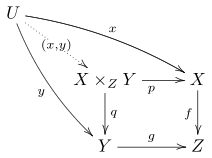
Difficult pictures
If the occasional picture takes too long to compile, or it comes out wrong, wrap it in \begin{bmlimage}.

\[ \text{\Xy-matrix in \texttt{bmlimage}: }\begin{bmlimage}\xymatrix{ A \ar[rd] \ar^\phi[r] & B \\ & C }\end{bmlimage} \]To deal with every TikZ picture automatically, use \bmlImageEnvironment{}. The following code shows how to even not load TikZ at all, so that LaTeXML can run through the preamble faster, saving potentially up to 1 minute.
\bmlImageEnvironment{tikzpicture}\iflatexml\else\usepackage{tikz}% ... ALL of the TikZ-related preamble code here\fi% No TikZ commands after this point!Videos
You can inject arbitrary html using \bmlRawHTML{HTML here} or \<div>TeX here\</div>. That is enough to insert videos, for example by typing the YouTube embed code. Note that characters must be escaped, for instance replace % with \%, and you must follow the xml syntax, so an attribute <iframe allowfullscreen> will need to be written as <iframe allowfullscreen="">.
\bmlRawHTML{<iframe allowfullscreen=""></iframe>}I advise you to remove width and height and replace them with a suitable style, such as:
\bmlRawHTML{<iframe style="width:100\%; max-width:1920px;aspect-ratio:16/9" src="https://www.youtube-nocookie.com/..." ...></iframe>}You can even create a macro:
\newcommand{\youtube}[2]{\bmlRawHTML{<iframe src="https://www.youtube-nocookie.com/embed/#1" title="#2" style=...></iframe>}}Foldable environments
If you want to hide a proof, a solution, or some additional details, you can use the <details> html tag, as follows:
Solution.
…details of the solutions…
I suggest creating an environment, for instance:
\iflatexml % for the HTML\newenvironment{solution} {\<details>\<summary>Solution.\</summary>} {\</details>}\else % for the PDF\newenvironment{solution}{\begin{proof}[Solution]}{\end{proof}}\fiThe html tags must be written in xml syntax (so \<br/> rather than \<br>). See Reference manual for more details.
Split by chapter instead of section, or not split at all
Add SPLITAT=chapter to GNUmakefile to split the output by chapters (you can use part, chapter, section…). Write SPLITAT= to output a single page.
You can also specify different splitting strategies for different files by writing:
$(AUX_DIR)/html/lecturenotes/index.html: SPLITAT=chapter$(AUX_DIR)/html/problemsheet1/index.html: SPLITAT=to the end of GNUmakefile. Be careful to specify the splitting on the index.html files rather than the final zip or SCORM target. See Reference manual for more details.
By default, all files are split by section.
Change MathJax version
The current default for BookML is MathJax 4, which provides the best rendering quality, speed, and accessibility features. However, if you need to go back to a previous version, use
\usepackage[mathjax=3]{bookml/bookml}Disable MathJax for an equation
Add \bmlDisableMathJax within the equation. For environments generating multiple equations, such as \begin{align*}, the command will only have effect on the row it appears. Please review the output in Firefox, Safari, and Chrome/Edge as it is likely to look different across different browsers.
Alternative formats
By default, BookML includes the PDF in the final output. Additional versions can be added by calling for instance
\bmlAltFormat{docs.large.pdf}{PDF (large print)}Then BookML will compile docs.large.tex to PDF and include it in the html output. The file will appear in the ‘Downloads’ menu of the bookdown style.
The inclusion of the PDF can be stopped by specifying an empty name:
\bmlAltFormat{docs.pdf}{}Please note that docs.large.tex must not contain the string \documentclass or it will be compiled by itself into separate html, zip, and SCORM.
See template.tex, template-sans.tex, template-sans-large.tex for an example.
Set the SCORM description
will set the SCORM package description so you won’t need to type it manually in your LMS.
Note that the metadata will also be included in the PDF. Use \iflatexml...\fi appropriately if you need different information. If the pdfsubject is not present, the abstract will be used as description.
Some PDF and EPS figures look odd or prevent compilation
By default, BookML uses dvisvgm to convert EPS images to SVG, and mutool to convert PDF images to SVG. If you do not want to install mutool, you can try setting PDFTOSVG_CONVERTER=dvisvgm in GNUmakefile. The output of make detect will help you determine if this is feasible on your machine.
If you cannot get good SVGs from the automatic conversion, you have two possibilities. You can convert the images yourself, and place the resulting images in the same folder and with the same name as the original PDF or EPS files, but extensions .svg, .png, or .jpg. You must use \includegraphics{figure} instead of \includegraphics{figure.pdf} for this to work. You can also disable the automatic conversion altogether with PDFTOSVG_CONVERTER=, at which point LaTeXML will convert the images to PNG using ImageMagick.
Some images look weird in sepia and dark mode
BookML changes colours to all the images in sepia and dark mode so that they match the surrounding text. This is generally fine for diagrams and graphs, but can be problematic for photos.
To prevent a specific image from changing, call \bmlPlusClass{bml_no_invert} immediately after the image. You can see the difference on the two pictures below.


Note that this only applies to images, meaning \includegraphics and environments converted using bmlimage, but not TikZ pictures processed by LaTeXML.
Run different code for PDF and for html
The conditional \iflatexml lets you pass different code to LaTeXML and LaTeX.
\iflatexml% code run by LaTeXML only, for the HTML\else% code run by LaTeX only, for the PDF\fiCustomise css (fonts, colors, etc)
Just add css files to the bmluser/ folder. See Reference manual for how files get included.
Disable the bookdown style
If you do not like the bookdown style and prefer a more plain page, use
\usepackage[style=plain]{bookml/bookml}Table headers
Marking table cells, rows, or columns as headers can be very important for accessibility, especially for screen reader users. LaTeXML offers a few rudimentary commands to deal with this. Import the bookml/bookml or the latexml package, and write the table as follows
\begin{tabularx}{\textwidth}{c|X||c} \lxBeginTableHead{} Header 1 & Header 2 & Header 3 \\ \hline \lxEndTableHead{} Content & Content & Content \\ More content & content & content \\ \hline\end{tabularx}Read the content of latexml.sty for more details about which commands are available for tables, and how you can use them.
| Header 1 | Header 2 | Header 3 |
|---|---|---|
| Content | Content | Content |
| More content | content | content |
Unsupported packages or classes
LaTeXML supports only so many packages (full list), and many only partially. If LaTeXML does not recognise a particular package or class, it is sometimes easy to make it work, but it can also be near impossible.
-
•
If you use your own custom-made package or class to keep your favourite packages and options (so essentially a fancy preamble): change its extension to .tex and use
\inputinstead of\usepackage. -
•
If the package is producing images: use
bmlimageas for TikZ. -
•
If LaTeXML supports a similar package: replace it (for instance, use actuarialangle instead of lifecon).
-
•
If the package is PDF-specific: use
\iflatexmland\newcommandin the preamble to define macros that do something equivalent, or nothing at all, in html. Useful, for instance, for references including page numbers, or setting headers and footers. -
•
If the class is not supported, tell LaTeXML to use a different class:
\RequirePackage{latexml}\iflatexml\documentclass[12pt]{book}\else\documentclass[12pt]{memoir}\fiMake sure your class options are consistent, for instance make sure you are using the same font size.
-
•
If none of the above works, copy the missing macros directly from the package (or class) and add them to your preamble (usually within
\makeatletterand\makeatother). It may work for simple packages, or packages partially supported by LaTeXML. -
•
Last resort, you can tell LaTeXML to attempt reading the entire package or class. To do this, create a file named package.sty.ltxml in the same folder as the .tex file (replace package with the actual package name, and sty with cls if dealing with a class):
This will instruct LaTeXML to read the content of package.sty. This may work wonderfully, or crash miserably.
3 Reference manual
This section follows closely the reference manual on the BookML repository, but may lag behind new versions.
3.1 Package options
BookML can be configured by loading the bookml/bookml package and passing options to it like with any other LaTeX packages, for instance \usepackage[mathjax=4]{bookml/bookml}. The following options are available:
- style=<name>
-
Switch style. <name> can be gitbook (default), which is almost identical to the output of bookdown, plain, which is a tweaked version of the normal LaTeXML style, and none for the default LaTeXML style with minimal compatibility and bug fixes only.
- mathjax=<number>
-
Select which MathJax version to use from 2, 3, 4 (default).
- nomathjax
-
Disable MathJax.
- imagescale=X.XX
-
(Deprecated) Rescale all images generated via LaTeX (using
bmlimage, see below) by the desired factor. Images are normally sized so that fonts inside the image match the font size of the browser, but there have been cases where BookML is wrong, and images turn out too small or too large. When that happens, tweak imagescale, and please report the issue. - nohtmlsyntax
-
Do not define the command
\<used for writing html tags directly in TeX.
3.2 Package commands and environments
Loading \usepackage{bookml/bookml} makes the following commands available. It also loads the latexml package, which provides additional commands such as \iflatexml and \lxRequireResource.
- \BookMLversion
-
The currently running version of BookML.
- \bmlAltFormat[<opts>]{<file>}{<label>}
-
Compile (if necessary) and include <file> in the download menu with label <label>. An empty label removes the file from the download menu. The optional argument <opts> is a key-value list passed internally to
\lxRequireResource(for instance, usetype=application/octet-streamif LaTeXML is not able to recognise the MIME type of the file). Only available in the gitbook style. - \<
-
Open or close an html tag, as in
\<span class="example">some \LaTeX{} code\</span>. The content between the tags is normal LaTeX code. Tags will normally generate an additional<p>...</p>tag, unless they can only contain ’phrasing content’. If necessary, the behaviour of each tag can be changed with the\bmlHTML*Environmentcommands. Tags must follow the XML syntax, for instance\<br>is not valid: you must write\<br/>. - \bmlHTMLEnvironment{<tag>}
-
Introduce or redefine an html tag environment, to be used as
\begin{h:tag}[attr1=val1,...]...\end{h:tag}or as\<tag>. - \bmlHTMLInlineEnvironment{<tag>}
-
Introduce or redefine an html tag environment which accepts ‘phrasing content’ only.
- \bmlRawHTML{<html>}
-
Insert <html> directly in the output document, after expanding all the TeX macros. When the command appears in the preamble, <html> will be part of the head and will be copied in every output page. <html> must be written in valid XML syntax, with either no namespace or the correct namespace for html.
- \begin{bmlimage}
-
The body of this environment is compiled directly into an SVG image via LaTeX, instead of running through LaTeXML.
- \bmlImageEnvironment{<env>}
-
Compile all environments <env> directly into SVG images via LaTeX, instead of running them through LaTeXML. The most typical example is
\bmlImageEnvironment{tikzpicture}for when LaTeXML struggles to process TikZ pictures properly or sufficiently quickly. Warning: this will not work properly when the environments are called implicitly (for instance, the package tcolorbox uses\begin{tikzpicture}internally to implement its theorems, and that could results in theorems appearing as images, and in the wrong places). - \bmlDescription{<text>}
-
Attach an alternative text <text> to the immediately preceding object. Only useful for images, for instance immediately after
\end{tikzpicture}. Warning: the command must immediately follow the object; even empty spaces can cause issues. - \bmlPlusClass{<class>}
-
Add the css class <class> to the immediately preceding object (this complements
\lxAddClassand\lxWithClassprovided by the latexml package). Warning: the command must immediately follow the object; even empty spaces can cause issues. - \bmlDisableMathJax
-
Disable running MathJax on the current mathematical content. When used in an environment that generates multiple equations, it applies only to the current one.
3.3 Makefile options
The build process accepts configuration options via Make variables, using the syntax VARIABLE=value. The options can be passed in three ways:
-
1.
In GNUmakefile before
include bookml/bookml.mk. Each option must appear on its own line, without indentation. -
2.
On the command line as
make VARIABLE=value. -
3.
To apply an option to a single output file, write it in GNUmakefile somewhere after
include bookml/bookml.mkasfile: VARIABLE=valueon its own line, without indentation. For instance,main.pdf: LATEXMKFLAGS=-pdflua. Warning: the variable must be applied to the target it affects immediately or it can cause inconsistent results (see for exampleSPLITATbelow).
Note that changing options will not trigger a recompilation of the files. You will typically need to run make clean before recompiling again. For more information about the Makefile syntax and how variables are evaluated, consult the GNU Make manual.
The following options are available.
- AUX_DIR
-
Location of the directory containing all intermediate files generated during compilation, such as .aux and .bbl files. This option is ignored by the BookML GitHub action. Default auxdir.
- SOURCES
-
Space-separated list of .tex files to be compiled. File names with spaces are not supported. Default is the list of .tex files in the current directory that contain the string
\documentclass(even if appearing in a comment!). - FORMATS
-
Spaces-separated list of formats to be generated from SOURCES. Recognised formats are pdf, scorm, zip. Default scorm zip.
- SPLITAT
-
How to split the html output into multiple files (chapter, section, subsection, subsubsection). Set to empty to disable splitting. See the latexmlpost manual,
--splitoption, for more details. Warning: when applied to a single target, it must be applied to$(AUX_DIR)/file/index.html:instead of sayfile.zip:, otherwise zip and SCORM outputs will see different values. Default section. - DVISVGM
-
Command to call dvisvgm. Default dvisvgm.
- DVISVGMFLAGS
-
Options to pass to dvisvgm. Default --no-fonts.
- LATEXMK
-
Command to call Latexmk. Default latexmk.
- LATEXMKFLAGS
-
Command options to pass to Latexmk. For instance, use
LATEXMKFLAGS=-pdfluato use LuaTeX when compiling to PDF. Please ensure that Latexmk will produce a PDF rather than a DVI. - LATEXML
-
Command to call LaTeXML. Default latexml.
- LATEXMLFLAGS
-
Options to pass to LaTeXML.
- LATEXMLPOST
-
Command to call latexmlpost. Default latexmlpost.
- LATEXMLPOSTFLAGS
-
Options to pass to latexmlpost. Warning: when applied to a single target, it must be applied to
$(AUX_DIR)/file/index.html:instead of sayfile.zip:, just like for SPLITAT. - MUTOOL
-
Command to call mutool. Default mutool.
- MUTOOLFLAGS
-
Options to pass to mutool draw.
- PDFTOSVG_CONVERTER
-
Select which converter to use for converting PDF images to SVG. Currently supported values are dvisvgm and mutool. If set to empty, LaTeXML will convert PDF to PNG using ImageMagick. Default mutool.
- PERL
-
Command to call Perl. Default perl.
- TEXFOT
-
Command to call texfot. Default texfot.
- TEXFOTFLAGS
-
Options to pass to texfot.
- ZIP
-
Command to call zip. Default zip (or miktex-zip if zip.exe is not available on Windows).
3.4 Makefile targets
The following targets can be used as arguments when calling make, for instance make zip.
- all
-
Compile all targets, based on the content of
SOURCES,FORMATS, andTARGETS. This is the default target. - check-for-update
-
Check if there is a new release of BookML available.
- clean
-
Delete all compilation products, based on
SOURCES,FORMATS, andTARGETS. - detect
-
Detect the versions of all the software required to run BookML and print them.
- html
-
Compile all
SOURCESto html. The outputs will be in the$(AUX_DIR)/htmldirectory. -
Compile all
SOURCESto PDF. The outputs will be in the current directory, including the SyncTeX files. - scorm
-
Compile all
SOURCESto SCORM. The outputs will be in the current directory. - update
-
Experimental: update the bookml/ directory. If BookML is being run from a Docker image, it will use the version bundled in the image, otherwise it will download the latest release. This operation is destructive, not well tested, and behaviour may change in the future; be prepared to download BookML manually if it breaks.
- xml
-
Compile all
SOURCESto XML. The outputs will be in the$(AUX_DIR)/xmldirectory. - zip
-
Compile all
SOURCESto zip. The outputs will be in the current directory.
3.5 Custom css, Javascript, …
The css files in the folder bmluser are automatically included at the end of the <head> tag and will override the previous styles. You may also include Javascript files (file extension js) and fonts (file extensions ttf, woff, woff2)
If the file name ends with .style1,style2-jobname.css, then that file will be used only when style=style1 is passed, or when style=style2 is passed and the main file being compiled is called jobname.tex. You can use ._all.css to ensure that the file is included in every style.
Custom css can also be added using \bmlRawHTML{<style> ... </style>} to the preamble, and likewise for \bmlRawHTML{<script> ... </script>}.
For instance, the plain version of this manual has been compiled with latin-modern.plain.css that sets the font to Latin Modern.
3.6 Others
- bml_no_invert
-
Applying this css class disable the color inversion of images in dark mode. This applies only to external images, such as EPS figures, or pictures converted using
bmlimage. The class can be applied to the image itself or to a surrounding paragraph, section, environment, etc. using one of\lxAddClass,\lxWithClass,\bmlPlusClass.
3.7 Options for the BookML GitHub action
Below is the list of arguments recognised by the BookML GitHub action. The list may be incomplete; see the BookML action page for details about the latest version.
- checkout
-
Whether to checkout the repository calling this action. Default:
true(boolean). - release
-
Whether to create a release containing the outputs generated by BookML. Default:
true(boolean). - upload-aux-directory
-
Whether to upload the entire aux directory, which contains all outputs generated by BookML as well as logs and other intermediate files, into a GitHub artifact attached to the workflow run. Default:
true(boolean). - scheme
-
Select which TeX Live scheme to use among basic, small, medium, full. Default:
'full'(string). - version
-
Select which version of BookML to use. Note that this only affects which Docker image is used; if the
bookml/folder is already present in the repository, that version of BookML will be used. Default:'latest'(string). - replace-bookml
-
Whether to replace the
bookml/folder with the one included in the Docker image. Default:false(boolean). - timeout-minutes
-
The maximum number of minutes to run BookML before cancelling the build. Default:
6(positive integer).
The action has the following outputs.
- outputs
-
File names of all outputs compiled by BookML.
- targets
-
File names of all targets that BookML tried to compile.
- outcome
-
Compiling outcome (one of
'success','failure','timeout','invalid','cancelled'). - aux-directory-url
-
URL of GitHub artifact containing the aux directory (only if
upload-aux-directoryis true). - release-url
-
URL of GitHub release (only if
releaseis true).