2 Examples and tips
While many .tex files will be fine with no changes, you may want to tweak the output further by invoking the \usepackage{bookml/bookml} or by adding settings to GNUmakefile. When using Overleaf, that means you also need to upload the bookml/ folder. Below are some notable examples. For the full list of options and commands, see the Reference manual.
Alternative text
For \includegraphics, just add the option alt={description of the image}, as in
\includegraphics[alt={Computation of ...}]{figure1}
For other images such as TikZ pictures, add \bmlDescription{text} right after the image. Do not leave any space between the picture and \bmlDescription! Please remember that sighted users can also benefit from descriptions. Consider using \begin{figure} and \caption{} instead.
Animations
Both animate and TikZ can produce animations, but LaTeXML does not support this at the moment. BookML can transparently convert the animations to SVG using \bmlImageEnvironment. For instance, add the following to the preamble:
\bmlImageEnvironment{animateinline}
Then all animations created with animateinline from the animate package will be converted faithfully.
For the occasional TikZ figure, adding \begin{bmlimage} around it will suffice.
\begin{bmlimage}\begin{tikzpicture}...\end{tikzpicture}\end{bmlimage}
Difficult pictures
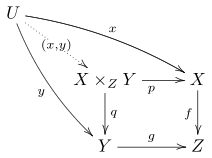
If the occasional picture takes too long to compile, or it comes out wrong, wrap it in \begin{bmlimage}.

\[ \text{\Xy-matrix in \texttt{bmlimage}: }\begin{bmlimage}\xymatrix{A \ar[rd] \ar^\phi[r] & B \\& C }\end{bmlimage} \]
To deal with every TikZ picture automatically, use \bmlImageEnvironment{}. The following code shows how to even not load TikZ at all, so that LaTeXML can run through the preamble faster, saving potentially up to 1 minute.
\bmlImageEnvironment{tikzpicture}\iflatexml\else\usepackage{tikz}% ... ALL of the TikZ-related preamble code here\fi% No TikZ commands after this point!
Videos
You can inject arbitrary html using \bmlRawHTML{HTML here} or \<div>TeX here\</div>. That is enough to insert videos, for example by typing the YouTube embed code. Note that characters must be escaped, for instance replace % with \%, and you must follow the xml syntax, so an attribute <iframe allowfullscreen> will need to be written as <iframe allowfullscreen="">.
\bmlRawHTML{<iframe allowfullscreen=""></iframe>}
I advise you to remove width and height and replace them with a suitable style, such as:
\bmlRawHTML{<iframe style="width:100\%;max-width:1920px;aspect-ratio:16/9"src="https://www.youtube-nocookie.com/..." ...></iframe>}
You can even create a macro:
\newcommand{\youtube}[2]{\bmlRawHTML{<iframesrc="https://www.youtube-nocookie.com/embed/#1"title="#2" style=...></iframe>}}
Foldable environments
If you want to hide a proof, a solution, or some additional details, you can use the <details> html tag, as follows:
\<details>\<summary>\textbf{Solution.}\</summary>...details of the solutions...\</details>
Solution.
…details of the solutions…
I suggest creating an environment, for instance:
\iflatexml % for the HTML\newenvironment{solution}{\<details>\<summary>Solution.\</summary>}{\</details>}\else % for the PDF\newenvironment{solution}{\begin{proof}[Solution]}{\end{proof}}\fi
The html tags must be written in xml syntax (so \<br/> rather than \<br>). See Reference manual for more details.
Split by chapter instead of section, or not split at all
Add SPLITAT=chapter to GNUmakefile to split the output by chapters (you can use part, chapter, section…). Write SPLITAT= to output a single page.
You can also specify different splitting strategies for different files by writing:
$(AUX_DIR)/html/lecturenotes/index.html: SPLITAT=chapter$(AUX_DIR)/html/problemsheet1/index.html: SPLITAT=
to the end of GNUmakefile. Be careful to specify the splitting on the index.html files rather than the final zip or SCORM target. See Reference manual for more details.
By default, all files are split by section.
Change MathJax version
The current default for BookML is MathJax 3, but MathJax 4 already seems to work well for most documents. If you want to jump ahead, use
\usepackage[mathjax=4]{bookml/bookml}
Disable MathJax for an equation
Add \bmlDisableMathJax within the equation. For environments generating multiple equations, such as \begin{align*}, the command will only have effect on the row it appears. Please review the output in Firefox, Safari, and Chrome/Edge as it is likely to look different across different browsers.
Alternative formats
By default, BookML includes the PDF in the final output. Additional versions can be added by calling for instance
\bmlAltFormat{docs.large.pdf}{PDF (large print)}
Then BookML will compile docs.large.tex to PDF and include it in the html output. The file will appear in the ‘Downloads’ menu of the bookdown style.
The inclusion of the PDF can be stopped by specifying an empty name:
\bmlAltFormat{docs.pdf}{}
Please note that docs.large.tex must not contain the string \documentclass or it will be compiled by itself into separate html, zip, and SCORM.
See template.tex, template-sans.tex, template-sans-large.tex for an example.
Set the SCORM description
\usepackage{hyperref}\hypersetup{pdfsubject={Description of this file}}
will set the SCORM package description so you won’t need to type it manually in your LMS.
Note that the metadata will also be included in the PDF. Use \iflatexml...\fi appropriately if you need different information. If the pdfsubject is not present, the abstract will be used as description.
Some PDF and EPS figures look odd or prevent compilation
By default, BookML uses dvisvgm to convert EPS images to SVG, and mutool to convert PDF images to SVG. If you do not want to install mutool, you can try setting PDFTOSVG_CONVERTER=dvisvgm in GNUmakefile. The output of make detect will help you determine if this is feasible on your machine.
If you cannot get good SVGs from the automatic conversion, you have two possibilities. You can convert the images yourself, and place the resulting images in the same folder and with the same name as the original PDF or EPS files, but extensions .svg, .png, or .jpg. You must use \includegraphics{figure} instead of \includegraphics{figure.pdf} for this to work. You can also disable the automatic conversion altogether with PDFTOSVG_CONVERTER=, at which point LaTeXML will convert the images to PNG using ImageMagick.
Some images look weird in sepia and dark mode
BookML changes colours to all the images in sepia and dark mode so that they match the surrounding text. This is generally fine for diagrams and graphs, but can be problematic for photos.
To prevent a specific image from changing, call \bmlPlusClass{bml_no_invert} immediately after the image. You can see the difference on the two pictures below.


Note that this only applies to images, meaning \includegraphics and environments converted using bmlimage, but not TikZ pictures processed by LaTeXML.
Run different code for PDF and for html
The conditional \iflatexml lets you pass different code to LaTeXML and LaTeX.
\iflatexml% code run by LaTeXML only, for the HTML\else% code run by LaTeX only, for the PDF\fi
Customise css (fonts, colors, etc)
Just add css files to the bmluser/ folder. See Reference manual for how files get included.
Disable the bookdown style
If you do not like the bookdown style and prefer a more plain page, use
\usepackage[style=plain]{bookml/bookml}
Table headers
Marking table cells, rows, or columns as headers can be very important for accessibility, especially for screen reader users. LaTeXML offers a few rudimentary commands to deal with this. Import the bookml/bookml or the latexml package, and write the table as follows
\begin{tabularx}{\textwidth}{c|X||c}\lxBeginTableHead{} Header 1 & Header 2 & Header 3 \\\hline \lxEndTableHead{}Content & Content & Content \\More content & content & content \\\hline\end{tabularx}
Read the content of latexml.sty for more details about which commands are available for tables, and how you can use them.
| Header 1 | Header 2 | Header 3 |
|---|---|---|
| Content | Content | Content |
| More content | content | content |
Unsupported packages or classes
LaTeXML supports only so many packages (full list), and many only partially. If LaTeXML does not recognise a particular package or class, it is sometimes easy to make it work, but it can also be near impossible.
-
•
If you use your own custom-made package or class to keep your favourite packages and options (so essentially a fancy preamble): change its extension to .tex and use
\inputinstead of\usepackage. -
•
If the package is producing images: use
bmlimageas for TikZ. -
•
If LaTeXML supports a similar package: replace it (for instance, use actuarialangle instead of lifecon).
-
•
If the package is PDF-specific: use
\iflatexmland\newcommandin the preamble to define macros that do something equivalent, or nothing at all, in html. Useful, for instance, for references including page numbers, or setting headers and footers. -
•
If the class is not supported, tell LaTeXML to use a different class:
\RequirePackage{latexml}\iflatexml\documentclass[12pt]{book}\else\documentclass[12pt]{memoir}\fiMake sure your class options are consistent, for instance make sure you are using the same font size.
-
•
If none of the above works, copy the missing macros directly from the package (or class) and add them to your preamble (usually within
\makeatletterand\makeatother). It may work for simple packages, or packages partially supported by LaTeXML. -
•
Last resort, you can tell LaTeXML to attempt reading the entire package or class. To do this, create a file named package.sty.ltxml in the same folder as the .tex file (replace package with the actual package name, and sty with cls if dealing with a class):
use LaTeXML::Package;InputDefinitions('package', type => 'sty', noltxml => 1);1;This will instruct LaTeXML to read the content of package.sty. This may work wonderfully, or crash miserably.